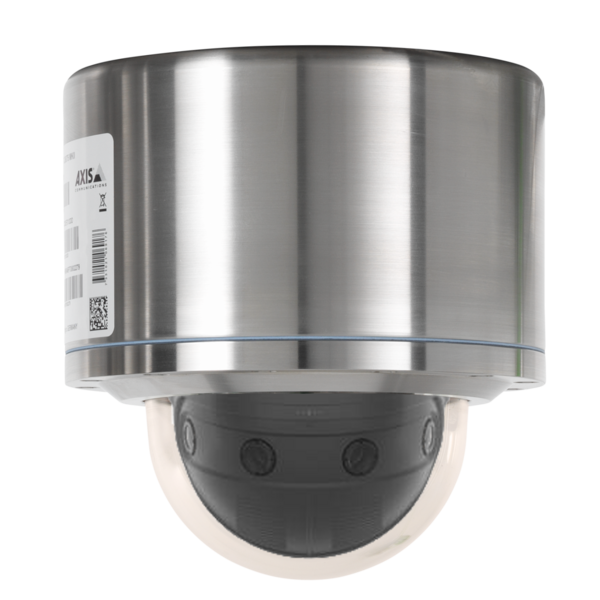
Safety instructions
Attention
- Absolutely observe the installation's safety directions of the T08 ExCam series!
- Observe the instructions on the type plate!
- The camera is not suitable for use in zone 0 and 20!
- Temperature class and explosion group must be absolutely adhered to!
- The specified temperatures have to be observed!
- The customer is not allowed to make any alterations of the camera.
- The camera must be operated in a proper and sound condition and only in the way intended.
- Repairs may only be carried out by using original parts from the manufacturer. Repairs which affect explosion protection may only be carried out in accordance with the nationally applied regulations and exclusively by the manufacturer.
- When installing the ExCam adhere to the requirements of the EN/IEC 60079-14.
- The ExCam devices with model key T08-VA4.1K.PS1 (optical thermoplastic) must generally not be used for applications in the mining industry (ATEX group I), nor in other hazardous areas with potentially "high" risk of damage caused by mechanical stresses (ATEX group II)!
- Risk of electrostatic charging! Clean only carefully with a soft, damp cloth.
- Be careful not to damage the dome’s UV resistant coating. Avoid scratches.
Warnings
WARNING:
DO NOT OPEN IN POTENTIALLY EXPLOSIVE ATMOSPHERES
Observe the safety instructions in the installation guide!
--------------------------------------------------------------------------------------------------------
ВНИМАНИЕ:
НЕ ОТКРЫВАТЬ в потенциально взрывоопасных средах
Соблюдайте инструкции по технике безопасности в руководстве по установке!
---------------------------------------------------------------------------------------------------------
AVERTISSEMENT:
NE PAS OUVRIR EN ATMOSPHÈRES EXPLOSIBLES
Respectez les consignes de sécurité dans le guide d'installation!
---------------------------------------------------------------------------------------------------------
AVISO:
NÃO ABRIR DENTRO DE UMA ÁREA COM PERIGO DE EXPLOSÃO
Observar as instruções de segurança nas instruções de instalação!
Explosion protection
| Identification marks acc. to Directive 2014/34/EU |
Ex II 2G (zone 1 and 2) |
| Ex II 2D (zone 21 and 22) | |
| Explosion protection (gas) | Ex db IIC T6 Gb |
| Explosion protection (dust) | Ex tb IIIC T80°C Db |
| Protection level | IP 66/68 (IEC /EN 60529) |
| Transport/ storage temperature | -40°C…+65°C (non-condensing) |
| Ambient temperature (EX) | -50°C...+60°C |
| Named testing laboratory | TÜV Rheinland (number 0035) |
| EU type approval certificate | TÜV 18 ATEX 8218X (2018) |
| IECEx Cert. of Conformity | TUR 18.0023X (2018) |
| INMETRO-Certificate | TÜV 23.0363X (2023) |
| EAC-Ex TUR Report | TC RU C-DE.HA65.B.01652/22 |
Model key
Ex product name | Model variants | Artikelnr. | ||||
|---|---|---|---|---|---|---|
ExCam | T08- | VA4.1K.PS1- | LL.H- | 000.X- | X | |
1) | 2) Type
| 3) Housing-(combination) | 4) Temp.-range | 5) Cable length [m] cable type | 6) Termination | Link to digital type plate |
Description:
- ExCam XF P3807 = Funktional camera description of the ExCam Series (technical data/ specification of the individual camera module)
- T08 = SAMCON Production- type 08
- VA4.1K.PS1 = T07 Ex-d housing (stainless steel 1.4404) with large diameter ØVA4=216mm) VA4.1K.PS1 = T07 VA4.1 housing with short body lenght (LR = 145mm)
VA4.1K.PS1 = No cable- gland flange
VA4.1K.PS1 = Thermoplastic Dome - LL.H = LowLow temperatures (Tamb > -50°C)
LL.H = High temperature battery installed (Tamb < +60°C) - 000.X = No connection line delivered
- X = flipConnect for easy electrical connection
Electrical parameters
Power supply of the camera (PoE):
Voltage supply: PoE, IEEE 802.3af/802.3at type1 class 3
Reference voltage: +48 V DC (44...54 V DC)
Maximum power consumption: 12.9 W
Typical power consumption: 7.0 W
Other technical data
Permissible ambient temperature: -50°C ... +60°C
Protection class as per EN 60529/IEC 529: IP66/68 (test conditions 24h/3m water column at 5°C)
Housing material: Stainless steel mat. no.: 1.4404
Weight: ca. 15kg
Dimensions: D216mm x 235,89 mm
Mounting
- Check device for transport damage on housing and cable.
- Carefully choose installation site (lightning conditions, object distance,...)
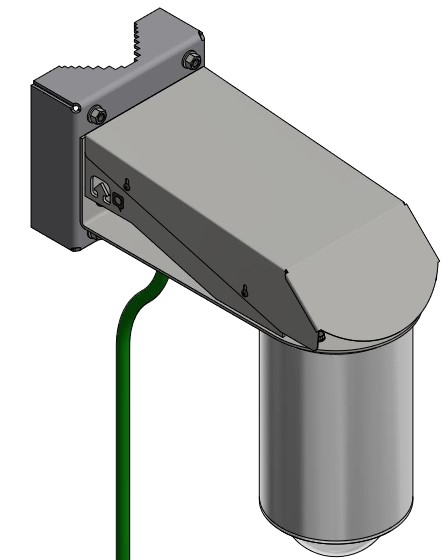
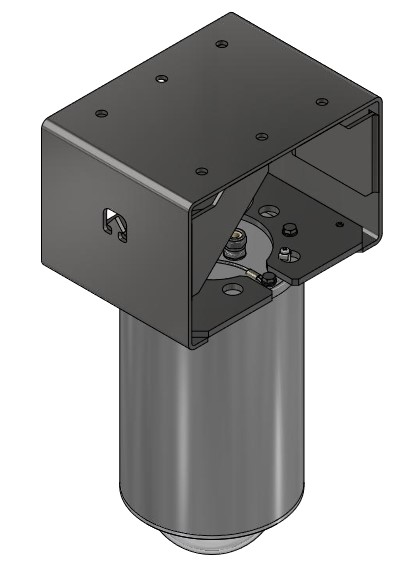
- Optional mounting accessories for easy fixation on Pole, Wall (hanging) or Ceiling/ Wall vertically.
- Depending on classification of hazard areas, it is imperative to obtain a work approval first!
When you open the pressure-resistant enclosure under voltage, it is absolutely necessary to prevent potentially explosive atmosphere! - Observe national safety, installation and accident prevention regulations (e.g. DIN EN 60079-14), safety instructions in the EX installation instructions and ATEX/IECEx regulations!
- Observe national and local regulations for mounting heavy loads. If in doubt, take appropriate safety measures.
Appropriate cables and cable entries
for this watch the following video-tutorial or the informations on the cable-page.
Rubber ring sealing screw connections
Make sure that the gland encloses the upper part of the plug and does not press on it.
Barrier cable glands
In combination with barrier cable glands do not use the included plug. Remove the outer jacket of the network cable and terminate its end with a suitable crimp connector. Pay attention to correct handling and follow the instructions in the respective installation instructions.
Tests prior to switching on voltage
Attention!
- Prior to starting the device, perform all tests as indicated by the national regulations. Furthermore, check the correct function and installation of the device in accordance with this User Manual and other applicable regulations.
- Incorrect installation or operation of the camera may lead to a loss of warranty!
- Do not switch on the camera at temperatures below 0°C!
Opening the pressure-resistant housing
Remove or loosen the bolted connections of the camera housing flange and body.
Carefully pull out the dome flange strictly vertically/perpendicularly. Because of negative pressure, it may be difficult to remove the flange. The cylindrical clearance fit (H8f7 - DIN ISO 286) of the camera body and flange may not be tilted! Risk of damage to the flame-proof gap (DIN EN 60079-1:2012)!

Attention!
Use particular care when dealing with installed components (camera module, optics, temperature control, electronics, etc.) which are fixated above the mounting adapter on the cable and supply flange (cable gland). Risk of damage!
When removing the flange, ensure that the Gylon flat gasket (Style 3504, blue) does not get damaged or dirty!
Adjusting the camera position
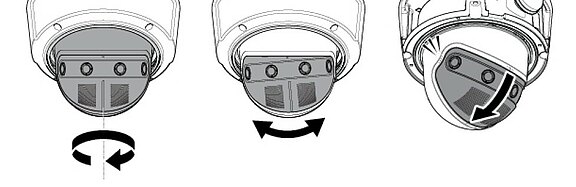
The camera position could be adjusted manually in the following waysManual turning +10°, manual panning +180°, manual tilting 0°/35°45°/55°
Removing / inserting a SD memory card
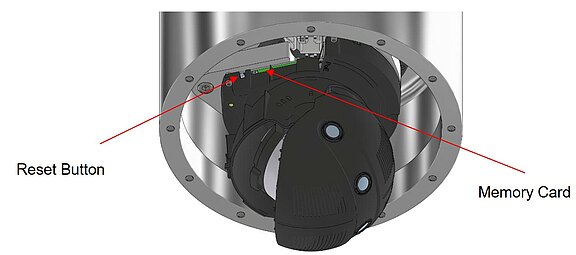
The ExCam XF P3807 has a slot for a micro SDHC memory card (card is included). Saved video files can be played and deleted via the web interface. They are also available in a download list. Moreover, the videos available in the memory card can also be accessed via FTP server in the network.If the memory card has to be replaced by the user, it should be, as far as possible, empty and pre-formatted with an ext4 or vFAT file system.
When touching electrical components, observe potential equalization (grounding of the body): carry electrostatic-discharge clothes, a PE wristband etc.!
Hardware Reset
To set all the parameters of the ExCam XF P3807 (including the IP address) to default values, you should run a hardware reset. The parameters can be reset via the web interface or manually. If the camera placed in the network can no longer be reached or its state is uncontrollable, the reset should be per-
formed manually. To do so, proceed as follows:
- Disconnect the camera installation module (Axis P3807) from the power supply.
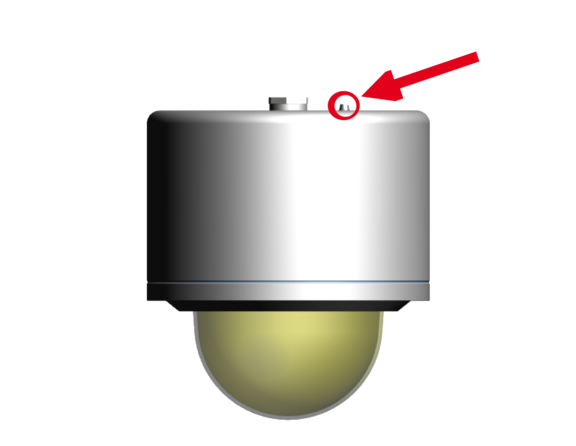
- Press and hold the control button (see the illustration below) and, at the same time, connect the system to the voltage supply (PoE).
- Hold the control button pressed for about 30 seconds.
- Release the control button. After about a minute, the AXIS P3807 will return to factory defaults. If there is a DHCP server in the network, the IP address will be the following: 192.168.0.90 (subnet masking 255.255.255.0).
- IP address and password can be redefined. If the hardware reset is not satisfactory or the network camera shows serious conflicts or does not work as usual (errors in the browser visualisation, frozen images, control commands no longer processed, slowing down of the system, etc.), it may be necessary to re-install the current firm-ware, or to install an update.
Closing of the pressure-resistant housing
For closing the housing, proceed in reverse order as when opening. Use exclusively original screws included in the supply. The cable and power-supply flange (K1) is fixed by 8 cylinder-head screws M4*0.7 (ISO metric right-turning) with 12 mm thread length (DIN 912/ ISO 4762, grade 6g). Materials of bolted connections are identical to the pressure-resistant stainless steel housing (standard material no. 1.4404 AISI316L). Check whether the threaded holes are undamaged and clean. Before closing, it is also absolutely imperative to check the flame-proof gap (circular cylindrical fit).
Attention!
If any mechanical damages occurred to the fitting gap, it is no longer allowed to use the housing!
Attention!
Do not lock-in any foreign objects in the housing.
Dismantled screw locks (spring washers DIN 127A) must be used again. The GYLON® gasket must be used in undamaged condition, according to the flange hole pattern, and placed between the flange and the hull. The lateral position of the flat surface / contact surface is arbitrary. If, when closing the housing, you see that the surface of the fitting gap is dirty or insufficiently lubricated, clean it with a clean cloth and de-grease it with a suitable cleaning agent. Then re-grease it with lubricant suitable for this specific application (e.g., Molykote® P-40 gel for standard applications or special grease OKS 403 in the event of heavy seawater influence).
Cylinder-head bolts for explosion-proof connection of the camera body with the flange component must always be tightened at a 3 Nm torque - crosswise and evenly! Use Loctite.
Attention
- Insert the flange to reach the end position, in order to ensure ignition protection and the protection level (IP) of the housing.
- The M6 screwed connections of the VA4.x flange and body components must always be tightened crosswise with a torque of 9.0 Nm! If the bolted connections are tightened too strongly, it can cause damages to the device!
- Do not to damage the surface of the drill hole and the shaft (fitting) of the flame-proof gap.
- Ensure that you do not damage the housing seals. Keep them clean.
- If the fitting gap is mechanically damaged, it is no longer allowed to use the housing!
- If the dome is damaged, it must no longer be used!
- Ensure that no foreign objects are entrapped in the housing.
Initial start-up
https://www.axis.com/products/axis-p3807-pve
Applicable net frequency: 50Hz or 60Hz
Carry out other net frequency: menu System Options > Advanced > Plain Config
User: root
Password: root
Browser support
A list of the currently supported web browsers, operating systems, required add-ons, etc. can be viewed at:
https://help.axis.com/access-your-device
https://www.axis.com/support
Allocating IP Adress
Most networks today include a DHCP server that automatically assigns IP addresses to connected devices. If your network does not have a DHCP server, the default IP address 192.168.0.90 (subnet mask 255.255.255.0) is used for the ExCam XF P3807. Using the AXIS IP Utility is the recommended method for setting an IP address in Windows.
https://www.axis.com/support/tools/axis-ip-utility
If you are unable to assign the IP address, you may need to check your firewall settings! AXIS IP Utility automatically detects ExCam devices on the network and displays them in a device list. You can also use this application to manually set a static IP address. To do this, the ExCam XF P3807 network camera must be installed in the same network segment (physical subnet) as the computer running the AXIS IP Utility. The ExCam XF P3807 has the network signature “Axis P3807.” The MAC address and serial number for unique device identification are also determined and displayed.


Questions about our products
If you have any questions about our products please contact our Sales Team.